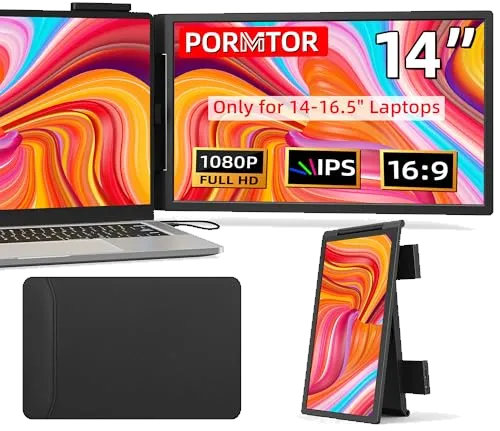
Single 14-inch extender
Z140Y21D Dual Extender HDMI 14-inch
by Pornitor
Independent guide. Not the official Pornitor site.
Pornitor's Z140Y21D is a 14-inch 1920×1080 IPS screen extender that clips to 14–16.5 inch laptops and connects by USB-C or mini HDMI.
Today's price and delivery date are shown on Amazon.
Check price on Amazon Read customer reviews on AmazonAs an Amazon Associate I earn from qualifying purchases.
Is it the right one for you?
Choose it if
- You want one extra 14-inch screen for a laptop whose display is 14–16.5 inches, as the maker sizes it.
- You need a plain full HD panel (1920×1080, 100% sRGB per the maker) for documents, web work and spreadsheets.
- You carry your setup around: the screen weighs 1.98 lb and ships with a carrying bag.
- Your laptop may have a USB-C port that only charges, since a mini HDMI cable is included as the video fallback.
Pick another if
- You want two extra screens stacked on the laptop instead of one → C140 Dual Extender USB-C/HDMI 14-inch
- You want three screens in total on one laptop → Z140 Triple Extender 14-inch
- Your laptop is 15.6 inches and you want a matching single extender → Z156Y21D Single Extender 15.6-inch
How big is it?
14 inScreen size
1920×1080Resolution
1.98 lbWeight
300 nitsBrightness
Before you buy
- Check your laptop's screen size. The maker says this extender fits 14–16.5 inch laptops, so smaller or larger screens are outside its range.
- Look for a full-function USB-C port on your laptop, meaning one that carries video. The maker says that if you see 'No Signal' over USB-C, the port only supports power.
- If USB-C shows no signal, plan on the mini HDMI to HDMI cable in the box. It needs an HDMI port on the laptop, so check that it has one.
- Mac owners should check their chip and port setup before buying. The maker lists Mac support but gives no detail on how many displays each chip can drive, and base M-series models are often limited to mirroring over a single cable.
- 300 nits is comfortable indoors and in shade. The screen has a matte anti-glare finish, but direct sunlight will still be a challenge.
- The extender hangs off the laptop lid, so a firm hinge matters. A loose hinge may let the lid tilt back under the added weight.
- The maker lists a 3 year manufacturer warranty in one place and a 1 year warranty description in another. Confirm which applies before you order.
Why it works
250° rotation
The maker says the screen rotates 250°, so it can work on a desk, a sofa or in a shared workspace.
Two ways to connect
Use the USB-C to USB-C cable for a single-cable link, or the mini HDMI to HDMI cable when your USB-C port does not carry video.
IPS panel, matte finish
It has a 1920×1080 IPS-type LED panel with a 1000:1 contrast ratio and a 120 degree viewing angle.
Split-screen work
A second screen lets you keep a document, a chat or a code editor open next to your main window.
Works with more than laptops
The maker lists Windows, Mac, Chrome, Android, Linux, Dex and Switch compatibility, and the product data also names gaming consoles, desktops and smartphones.
Eye care mode
The maker lists eye care and color enhancement as picture features on this frameless, ultra-slim panel.
Specifications
| Screen size | 14 inches |
|---|---|
| Resolution | 1920 x 1080 (FHD) |
| Panel | IPS, matte finish |
| Brightness | 300 nits |
| Refresh rate | 60 hertz |
| Dimensions | 0.2 x 9.7 x 13.7 inches |
| Weight | 1.98 pounds |
| Model number | Z140Y21D |
What's in the box
- Portable monitor
- User manual
- Carrying bag
- USB-C to USB-C cable
- USB-A to USB-C cable
- Mini HDMI to HDMI cable
Questions & answers
Will it fit my laptop?
It is made for laptops with 14–16.5 inch screens, according to the maker. Laptops outside that range are not covered.
Why do I see No Signal over USB-C?Your laptop's USB-C port probably supports power only. The maker advises connecting the included mini HDMI to HDMI cable to the monitor's extended port to get a video signal.
Does it work with a Switch or PS5?Yes, the maker lists Switch compatibility and the product name mentions PS5. Gaming consoles also appear among the compatible devices.
What comes in the box?You get the portable monitor, a user manual, a carrying bag, a USB-C to USB-C cable, a USB-A to USB-C cable and a mini HDMI to HDMI cable.
Do I need to install drivers?No, the maker describes it as plug and play without a driver, using one cable for the connection. You may still need to choose extend or mirror in your display settings.
What is the refresh rate and brightness?It runs at 60 hertz and reaches 300 nits. The maker also lists a 1000:1 contrast ratio.
Compare Pornitor models
| Z140Y21D Dual Extender HDMI 14-inch | 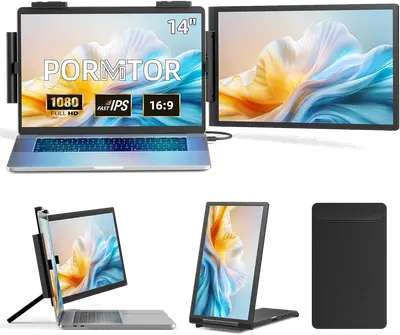 C140 Dual Extender USB-C/HDMI 14-inch | |
| Check price on Amazon | Check price on AmazonDetails |