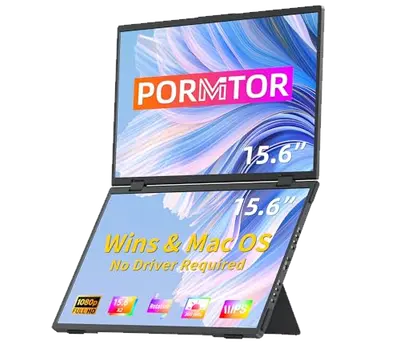
Stacked screens for laptops
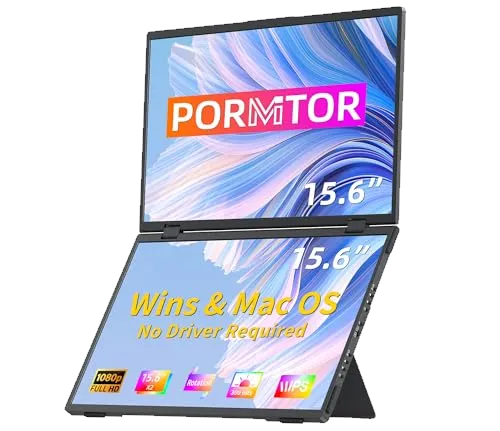
Stacked Dual Monitor 15.6-inch
by Pornitor
Independent guide. Not the official Pornitor site.
Two stacked 15.6-inch 1920×1080 screens that fold flat for Windows and Mac laptops with a full-featured USB-C port, driven by one cable on Windows.
Today's price and delivery date are shown on Amazon.
Check price on Amazon Read customer reviews on AmazonAs an Amazon Associate I earn from qualifying purchases.
Is it the right one for you?
Choose it if
- You want two extra screens stacked in a vertical layout beside your laptop, and your Windows laptop has a full-featured USB-C port that can drive both over one cable.
- You like to carry a folded unit that measures 11.8×7.6×0.4 inches and has a metal frame the maker says protects the display.
- You need to show your work to someone across the table: the upper screen rotates 360°.
- You have a Mac with an M1 Pro, M2 Pro, M3 Pro, M1 Max, M2 Max or M3 Max chip and can connect two USB-C cables for split screen.
Pick another if
- You only need one extra screen and a 15.6-inch single panel is enough → Z156Y21D Single Extender 15.6-inch
- You want touch input on a single 15.6-inch portable monitor → Touchscreen Portable Monitor 15.6-inch
- Your laptop is 14-inch class and you want a triple extender built for it → Z140 Triple Extender 14-inch
Key numbers
15.6 inEach panel
1920×1080Resolution
300 nitsBrightness
60 HzRefresh rate
Before you buy
- Check that your laptop's USB-C port is full-featured, meaning it carries video as well as data. A port that only handles data will leave the screens dark, and if you have two USB-C ports, try both.
- On a Mac, split screen across both panels works only with M1 Pro, M2 Pro, M3 Pro, M1 Max, M2 Max and M3 Max chips, and it takes two USB-C cables. The maker does not list other Mac chips for split screen.
- Windows laptops need one USB-C cable for both screens, according to the maker. Three Type C to Type C cables are included, so you will not need to buy cables for this.
- The panels run at 300 nits. That suits indoor rooms, but direct sunlight will make the screens hard to read, so plan to work in shade.
- Both panels are 1920×1080 at 60 Hz. If you need a higher refresh rate or resolution, this model does not offer it.
- After connecting, open your display settings and choose extend, mirror or split mode yourself. The maker says no drivers or apps are required, but the OS may default to mirroring.
- The unit sits on a built-in stand with a 90° adjustable angle and is listed as a desk mount. Make sure you have flat desk space, since it does not clip to the laptop lid.
Why it works
Two panels, one stack
Two 15.6-inch IPS LCD panels sit one above the other, giving a vertical layout. The maker says this cuts down on scrolling and switching between pages.
One cable on Windows
Windows needs a single USB-C cable for both screens, with no drivers or apps. Macs need two cables for split screen.
Four display modes
The maker lists extend, mirror, split and portrait modes. Each screen has its own brightness and RGB adjustment.
Rotating upper screen
The upper screen turns 360°, so a colleague or friend on the other side can see what you are showing.
Metal frame that folds
The all-metal frame is meant to protect the display when you carry it folded. Closed, it measures 11.8×7.6×0.4 inches.
Panel specs on paper
Each IPS panel has a 178° viewing angle, 100% sRGB, a 1000:1 contrast ratio and a matte finish. That color range suits documents and web work.
Specifications
| Screen size | 15.6 inches, two stacked panels |
|---|---|
| Resolution | 1920×1080 (FHD) |
| Panel | IPS LCD, matte, 16:9 |
| Brightness | 300 nits |
| Refresh rate | 60 Hz |
| Viewing angle | 178° |
| Folded size | 11.8×7.6×0.4 inches |
| Ports | 3 USB-C, 1 HDMI |
What's in the box
- Dual portable monitor
- Adapter
- 3 Type C to Type C cables
- Cloth
Questions & answers
Will it work with my MacBook?
Yes, it is compatible with macOS, with a limit on split screen. Only M1 Pro, M2 Pro, M3 Pro, M1 Max, M2 Max and M3 Max chips support split screen, and the Mac needs two USB-C cables for it. The maker does not list other chips for split screen.
What kind of USB-C port does my laptop need?Your laptop needs a full-featured USB-C port, according to the maker. A port that does not carry video will not light the screens, so check your laptop's specs or try each USB-C port you have.
What comes in the box?The box holds the dual portable monitor, an adapter, a cloth and 3 Type C to Type C cables.
How is it different from the Z156Y21D Single Extender 15.6-inch?This model has two stacked 15.6-inch panels, while the Z156Y21D is a single 15.6-inch extender. Choose this one when you want two added screens and the Z156Y21D when one is enough.
Can I connect a console or other devices?Yes, it has 3 full-featured USB Type-C ports and 1 HDMI port. The maker names laptops, PCs, PS4/5, Xbox and Switch as devices to use with it.
Is it bright enough to use outdoors?It is rated at 300 nits with a matte screen finish, which suits indoor use and shade. The maker does not state a sunlight rating, so direct sun is likely to be a problem.
Does it have a warranty?Yes, the manufacturer warranty is listed as 3 years.
Compare Pornitor models
| Stacked Dual Monitor 15.6-inch | 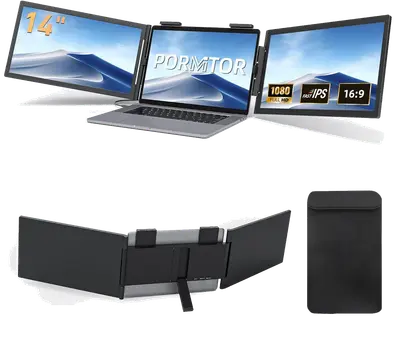 Z140 Triple Extender 14-inch | |
| Check price on Amazon | Check price on AmazonDetails |